
3D model turntable maker: 360° MP4 videos in your browser
Open the turntable makerFree · runs in your browser · files stay on your device
In short: open the turntable maker, drop in your model, pick a look and angle, then choose Export → Turntable video. Shot3D renders a seamless 360° loop frame by frame on your device and saves an H.264 MP4. You choose the resolution (up to 1080p on Pro, 4K on Studio), length (3 to 30 seconds), frame rate (24, 30 or 60 fps) and whether the model spins or the camera orbits.
A turntable is the most convincing way to show a 3D model: buyers see every side, and it works on marketplace listings, ArtStation, Instagram Reels, TikTok and YouTube Shorts. Normally it means keyframing a rotation and rendering an image sequence. Here it's one click.
How to make a turntable video
- Open the turntable maker. It opens with the Studio Grey look, a neutral backdrop that suits most models.
- Drop in your model. GLB, glTF, FBX, OBJ, STL, PLY and 3MF are all supported.
- Set up the shot. Press 1 for the 3/4 view and F to frame. Press R to preview the rotation and check nothing clips at the edges.
- Choose the video settings. In the Export tab, under Turntable video and GIF, set the resolution, duration, frame rate, motion (Model spins or Camera orbits) and direction. The aspect ratio comes from the Image section: Square 1:1, Widescreen 16:9, or Story 9:16 for Reels and Shorts.
- Export. Choose Export → Turntable video. A progress bar counts through the frames, and the video downloads when it's done.
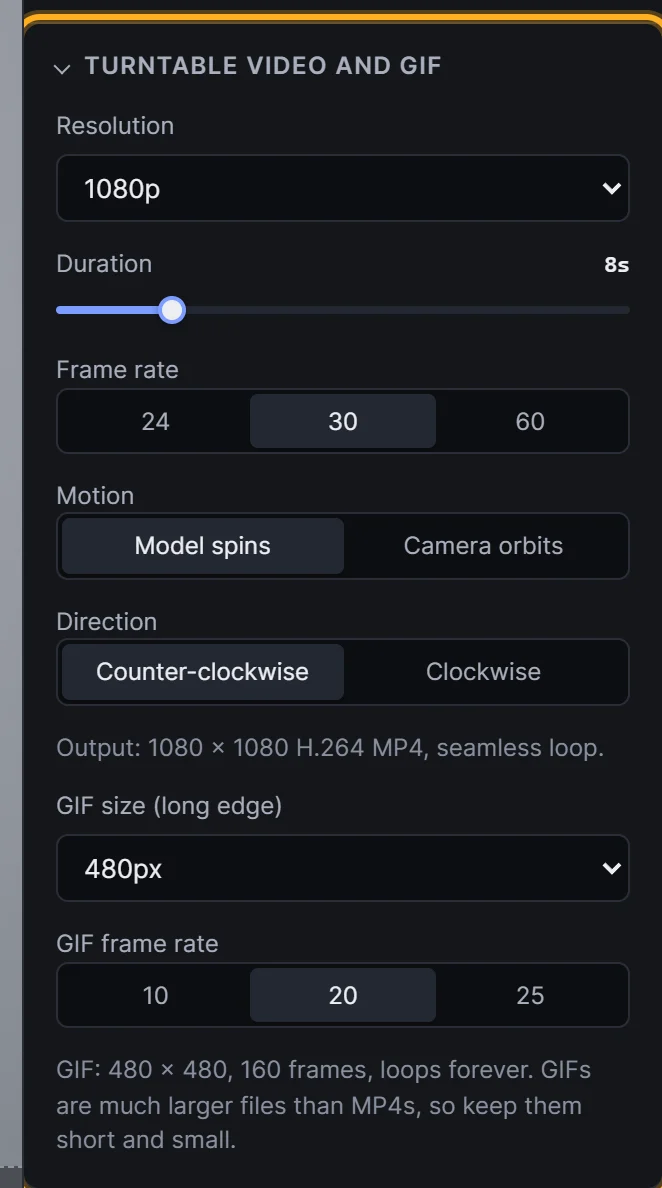 Turntable settings: resolution, duration, frame rate, motion and direction
Recommended settings
| Where it's going | Aspect | Duration | Frame rate |
|---|---|---|---|
| Marketplace listing | 1:1 or 16:9 | 8–10 s | 30 fps |
| ArtStation or portfolio | 16:9 | 10–12 s | 30 or 60 fps |
| Reels, TikTok, Shorts | 9:16 | 6–8 s | 30 fps |
Try a clay or wireframe turntable too: switch the look to Clay Render or Topology Wireframe before exporting.
Which plans include video?
Turntable MP4 export is part of Pro (up to 1080p) and Studio (up to 4K). New customers can try Pro for £1 for 3 days, with up to 25 exports. On the Free plan you can set up and preview the turntable with auto-rotate, and export still images. See exporting a turntable video for every setting.
Frequently asked questions
Does the turntable loop seamlessly?
Yes. The rotation is exactly 360° at a constant speed with no repeated frame, so it plays smoothly on repeat.
Which browsers can export MP4?
MP4 export uses the browser's built-in video encoder (WebCodecs). Current Chrome, Edge and Safari on desktop work best. If a size isn't supported, Shot3D tells you and suggests a smaller one.
Can the video have a transparent background?
No. MP4 doesn't support transparency, so a transparent background is replaced by the Video fallback colour you choose in the Scene tab.
Can I make a video from an STL or OBJ file?
Yes. See the STL and OBJ to video page for tips on each file type.
Can I make a GIF instead?
Yes. Choose Export → Turntable GIF for a looping GIF with the same settings, ideal for Discord, Reddit and READMEs, on every plan. See the 3D model to GIF maker.
Is my model uploaded to make the video?
No. Every frame is rendered and encoded on your own device. Nothing is uploaded.